
Private and remote
From anywhere. Through nobody.
Tailscale is built in, so the box joins a private network only your devices can see. Everything else here is what keeps it that way.
01Remote & protected
Included, nothing extra to buyReach it from anywhere. Nobody else can.
Tailscale is built in. Turn it on once in the Network drawer and your box joins a private network only your devices can see, so you can take over from an office, or a phone on mobile data, exactly as you would from the next room.
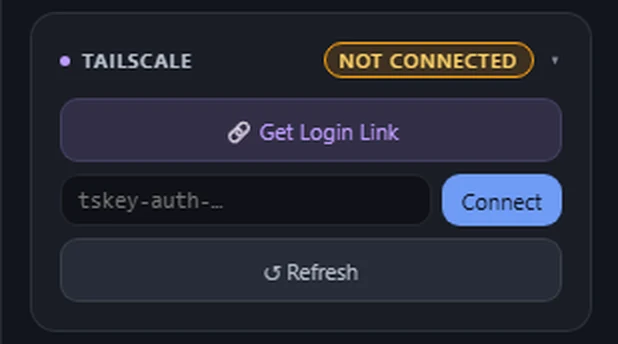
No ports opened on your router. The picture and your keystrokes travel straight between your browser and the box, never through our servers. The box checks for updates, and remote access, if you turn it on, is handled by Tailscale rather than by us.
Six layers between it and everyone else
- 01
A password on the page.
The control page will not open without it. You choose it the first time you sign in, and it is the only one you need.
- 02
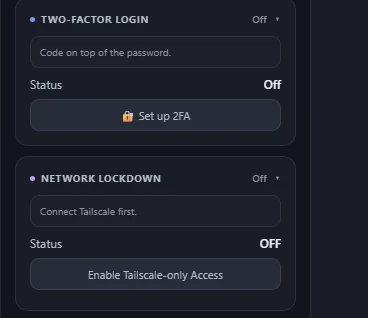
Two-Factor Login.
Add a 6-digit code from your authenticator app, with recovery codes you save once. Signing out ends every remembered sign-in, on every device.
- 03
Network Lockdown.
Turn it on and the box stops answering anything outside your private network, even on your own WiFi.
- 04
Connections, with Disconnect.
Every live connection shows its address, browser and how long it has been there, with a Disconnect button beside each one.
- 05
Nothing passes through us.
Your screen and your keystrokes go directly between your browser and the device. Nothing you see or type touches our servers.
- 06
Logs that never land.
Sign-ins and connection history live in memory and are gone on restart. It keeps no record of your sessions between restarts.
02Trust
Locked down, and for a computer you own.
- It’s for a computer you own.
- Built to run a machine you own, or one you are authorised to manage. Not to watch someone else’s.
- It stays on your network.
- The screen and your controls go straight between your browser and the box, never through our servers, with no cloud account in the middle. Away from home, it travels with you over Tailscale.
If you find a security problem, write to support@kiterelay.com. A real person reads it. What to include and what happens next are on the security page, and the standard security.txt points the same way.
Questions about this? The FAQ has a section on away from home.